
How to find new grant funders
Is frequent prospecting needed? This guide answers that question, and provides the best methods for finding and evaluating new grant funders without using an expensive paid database.
Topic: Prospecting12 min read
Topic: Grants management12 min read
I’ve built this free grant tracking resource for grant professionals who prefer using spreadsheets or who are not quite in a place to adopt a grant management tool. No sign-ups or paywalls.
While spreadsheets may not be the ideal way to track grants, they can certainly do the job if built well. Most spreadsheets I’ve seen are designed for functionality and simplicity, not necessarily for optimal data management. So, I’ve taken the foundation of Grantary and built a spreadsheet that offers the functionality with the minimum ideal content to gather for your grant efforts. As an added bonus, if you ever decide to join Grantary, you can use this spreadsheet to import your content into the platform.
This spreadsheet is offered for free, with no email sign-up required.
Use the link below to access this free grant tracking spreadsheet on Google Sheets, where you can download to Excel or make a copy within your Google Drive.
Whether you’re using a grant management platform like Grantary or using a spreadsheet, the goal of any grant professional should be to create sustainability and clarity in their management of grants.
If you prefer to design your own grant tracker, or if you want to learn more about how I designed mine, I’ll walk you through how to set up your spreadsheet to facilitate both sustainability and clarity for your organization.
Create a tab for funders. As the name suggests, funders are all corporations, foundations, individuals, and government entities that can or do fund your organization’s mission. It’s important to have your funders in a separate list as doing so will give you a clear and comprehensive picture of all funders you’ve vetted or interacted with over the years. If you’re only tracking grants you’re applying to, where does the information go pertaining to that one random (perhaps negative) conversation you had with a grant maker at a partner’s holiday party? These small touch points and “let’s not pursue this funder” decisions are vital to track for the sustainability of your grant efforts. Additionally, for funders you are pursuing over the years, one funder can be tied to a number of grants you submitted, secured, and lost.
You won’t spend too much of your time in funders, but it’s important to get it set up just right.
Information to include for funders:
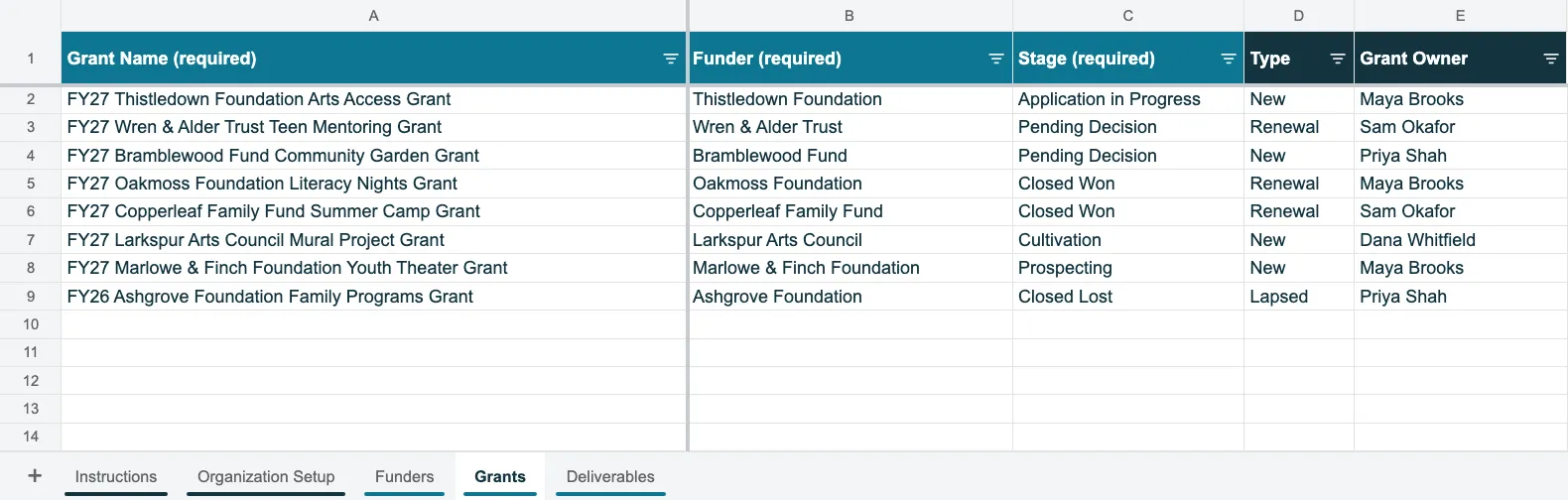
Create a tab for grants. Grants are all funding initiatives that you plan for, apply for, win, or lose over the years. One grant can have multiple deliverables (LOI, application, report, etc.), and it serves as the main component that ties those deliverables together. Therefore, it is important to view grants as a big-picture, macro-level function of your work. Most grant tracking spreadsheets I’ve seen reference grants as the micro-level work, which then makes it harder to understand what you’ve actually applied for, won, and lost.
You’ll spend more time in your grants tab than your funders tab. I list below what I include in the grants tab of my spreadsheet.
Information to include for Grants:
 Michael’s note
I strongly encourage consistency with how grants are named. Having 5 grants for the ACME Foundation all titled “grant application” does little to help you stay organized. The naming convention that I’ve historically used is: FYXX “Funder” “Grant Initiative.” For example: FY27 ACME Foundation Better Lives Grant, where FY27 is the fiscal year that the grant will support.
Create a tab for deliverables. Deliverables are the day-to-day tasks that propel your work forward: the applications, LOIs, and reports that all grant professionals are responsible for delivering on time. One grant can have multiple deliverables. For example, a grant effort can start with just an LOI deliverable. If you get invited to submit an application, that same grant will then have an application. If you win the grant, it will lastly have a final report. In this example, the LOI, application, and final report are all distinct deliverables that feed into one grant effort.
You’ll spend most of your time tracking and updating deliverables. Therefore, it’s important to get it right.
Information to include for Deliverables:
For sustainability, make sure you track everything important about a funder, grant, or deliverable. For clarity, make sure it’s added where it should live. Follow these steps to get the most out of your grant tracking spreadsheet using the template I provided.
Michael’s noteThe general rule for data storage is: gold in, gold out. This means that the more information and better-quality information you add in (clarity), the more sustainability it will create. I’ll note minimum fields to include, but do your best to fill out all columns when you can.
1. Start with the Organization Setup tab.
2. Add your funders.
3. Add your grants.
4. Add your deliverables.
5. Delete the example rows.
These are some of the best practices that I’ve developed during my time guiding a national team of 10 grant writers on data management.
A spreadsheet can work. However, it typically only works for organizations that apply for a handful of grants each year. Beyond that, it should be viewed as a temporary solution. Here’s why, starting with what I see as most important:
Please use the grant tracking spreadsheet I built. I wanted to offer it for free to all nonprofits in an effort to help you better track your grants. When you’re ready to start using a grants management app and if you are considering Grantary, my provided grant tracker can import easily into Grantary.
Once you’re in Grantary, you’ll get access to these features and benefits:
Free for 30 days, no credit card required. Start your free trial →
In my opinion, a grant tracking spreadsheet should track funders, grants, and deliverables separately. For funders, at minimum, include the funder name, type, relationship, mission, and funding priorities. For grants, at minimum, include the grant name, the funder it is associated with, and the current stage. For deliverables, at minimum, include deliverable name, associated grant, type, stage, and Due Date.
Yes, and you can do so quite effectively if you’re working for a smaller organization or an organization that only applies for a handful of grants each year. Beyond that, spreadsheets can easily become unmanageable or they can inhibit the sustainability and clarity of your grants management.
Completely free, no sign-up required. Just click the link to be taken to my Google Drive, where you can download a copy.
When you’re ready, Grantary has a dedicated import page that will guide you through the process of importing your content. If you’re coming from the grant tracking spreadsheet I shared, all you have to do is export each tab into a CSV and then import.
Get the next one in your inbox. I’ll email you when a new guide is published, about once a month.
Is frequent prospecting needed? This guide answers that question, and provides the best methods for finding and evaluating new grant funders without using an expensive paid database.
Topic: Prospecting12 min read
This resource was designed for grant writers looking to integrate AI into their processes, nonprofit or fundraising leaders seeking to responsibly roll out AI for their teams, and all nonprofit professionals looking for AI implementation tools.
Topic: AI18 min read
From my experience, the feedback I hear most about AI is that it generates bland, vague content which rarely leads to a well written grant proposal. The emphasis of this resource is: good output starts with good setup. Learn how to configure AI around your organization so its grant drafts are accurate, on-brand, specific, dynamic, and genuinely useful. Everything in this resource applies across Claude, ChatGPT, and Gemini.
Topic: AI15 min read
The to do list after the award or denial email is just as important as the application itself. This resource provides my suggested approach for what to do in either case, and how Grantary can help.
Topic: Grants management10 min read
The answer? Any of them: Claude, ChatGPT, and Gemini are all capable and their features are comparable. This guide walks you through the details, the key components I’ve learned, and how to decide which AI platform is best for you.
Topic: AI7 min read
Then $600 a year for your whole organization. If your current setup is working, there’s no rush. It’ll be here when you need it.
